Welcome to Quanify
Quanify runs your strategies on your own broker accounts and copies one account into the others. Signals arrive by webhook, get checked and sized per account, and land at the broker, with the engine running server-side, so nothing stops when you close the laptop.
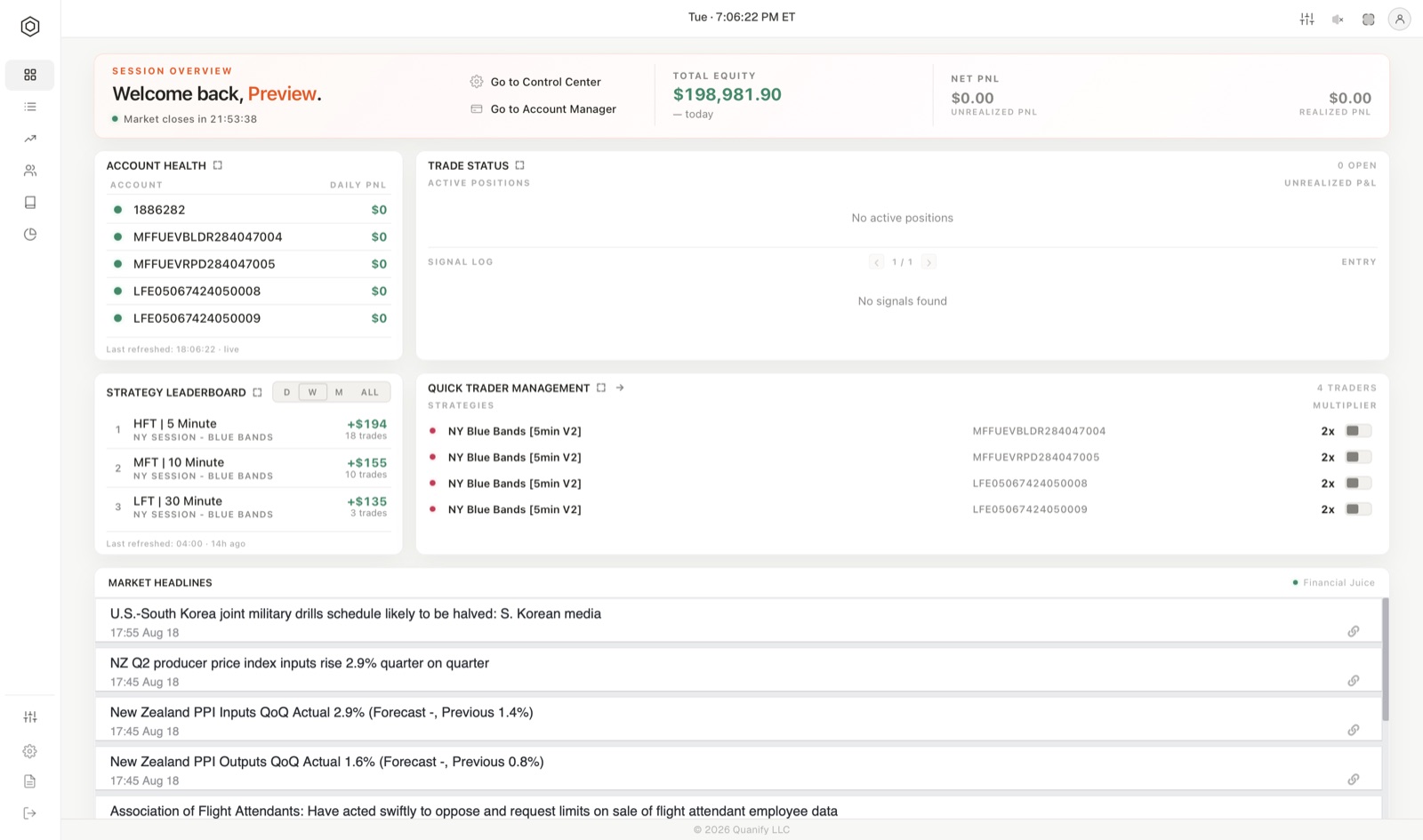
What the platform does
Two products sit on the same engine and the same broker connections, and a connected account serves both.
- Automation: route a strategy to any of your sub-accounts. The strategy can be your own, fired from TradingView or your own code, or one of Quanify's published strategies. Each account gets its own contract multiplier.
- Copy Trader: mirror one leader account into follower accounts, each with its own lot multiplier. Built for manual traders: you trade the leader by hand and the rest follow.
Around those two sit the surfaces that tell you what is happening: Home, Connections, the Cockpit and each published strategy's own page.
The workspace
The workspace at trade.quanify.pro has one tab per job.
| Tab | What it is for |
|---|---|
| Home | Equity and P&L, account health, open positions with Flatten All, the strategy leaderboard, quick trader switches and this week's economic calendar. |
| Connections | Every broker connection and paper account, with balances, status and the per-account mute and flatten controls. |
| Copy Trader | The Cockpit: leader, followers, multipliers, the live order book and Power On. |
| Strategy Library | Published Quanify strategies and your own webhook strategies. |
| Manager | Traders: which strategy trades which accounts, at what multiplier, and whether the engine has confirmed it. |
| Settings | Profile, password, billing, theme, alerts, Discord and the account reset. |
| Help | These docs by topic, Discord, prop-firm discount codes. |
Trade Journal and Portfolio Builder appear in the sidebar marked Soon. They are not open yet; the pages in the Tracking section say what each will do. A Copy Trader plan sees Home, Connections, Copy Trader, Settings and Help; the Strategy Library and Manager belong to Automation plans. See Plans and billing.
The vocabulary
Five words carry most of the product. The glossary has the rest.
- A connection is one link to one broker login.
- A sub-account is one tradeable account under that connection. Everything routes and sizes per sub-account, never per connection.
- A strategy is a source of signals.
- A trader is one strategy pointed at one or more sub-accounts, each with a multiplier.
- Armed means the engine has confirmed it holds the routing for every powered-on account on that trader. It is the only status that means signals will reach the broker.
What you need
- A supported broker account. Tradovate connects over OAuth, demo or live, and TopstepX connects with your username and an API key. NinjaTrader appears in the connect flow marked coming soon. A demo account, or a Quanify paper account, works for everything in this documentation.
- A signal source, if you are automating your own strategy: a TradingView alert, a Python script, or anything that can send an HTTP POST.
You do not need to install anything and you do not need a VPS. The engine runs server-side, so your routing stays live with your machine off. The browser workspace is the full product.
How Quanify treats your accounts
Four rules hold everywhere in the product, and the rest of this documentation repeats them because they are the ones worth knowing before you connect anything.
- Nothing routes until you power it on. New strategies are created powered off, every account you add to a trader lands disabled, every follower you add lands disabled. Building a route and arming it are two separate actions on purpose.
- Quanify never flattens a position on its own. Not when you power a trader off, not when you delete a strategy, not when a connection drops, not when a subscription lapses. Every control that closes a position is a button you press.
- Fills only ever clone to accounts you own. The engine refuses to fan a fill out across an ownership boundary, and it checks that on every fill rather than once at setup.
- There is no Quanify brokerage. Your accounts stay where they already are, your money never moves through Quanify, and disconnecting leaves your positions exactly where they were.
Where to start
- Quickstart: from a fresh account to a live trader, in order.
- Connect a broker: the connect flow, environments and prop-firm accounts.
- Webhooks and alerts: the exact payload to send.
- Risk controls: what stands between a signal and an order, and what does not exist yet.
If something is not behaving the way this documentation describes, Troubleshooting covers the failure modes and what the workspace shows for each one.
How to read the rest of this
Anything described as engine-held is authoritative: it is read by the process that places orders, so it survives a refresh, a second device and a sign-out, and cannot disagree with what you see. Anything off by default is off because turning it on is a decision someone should make deliberately.
Where a page describes a control, it also says what that control cannot do. Muting stops the next order, not the current position. Documentation that only lists what a control prevents is documentation that will surprise you on the day it matters.